
What the Page Shows
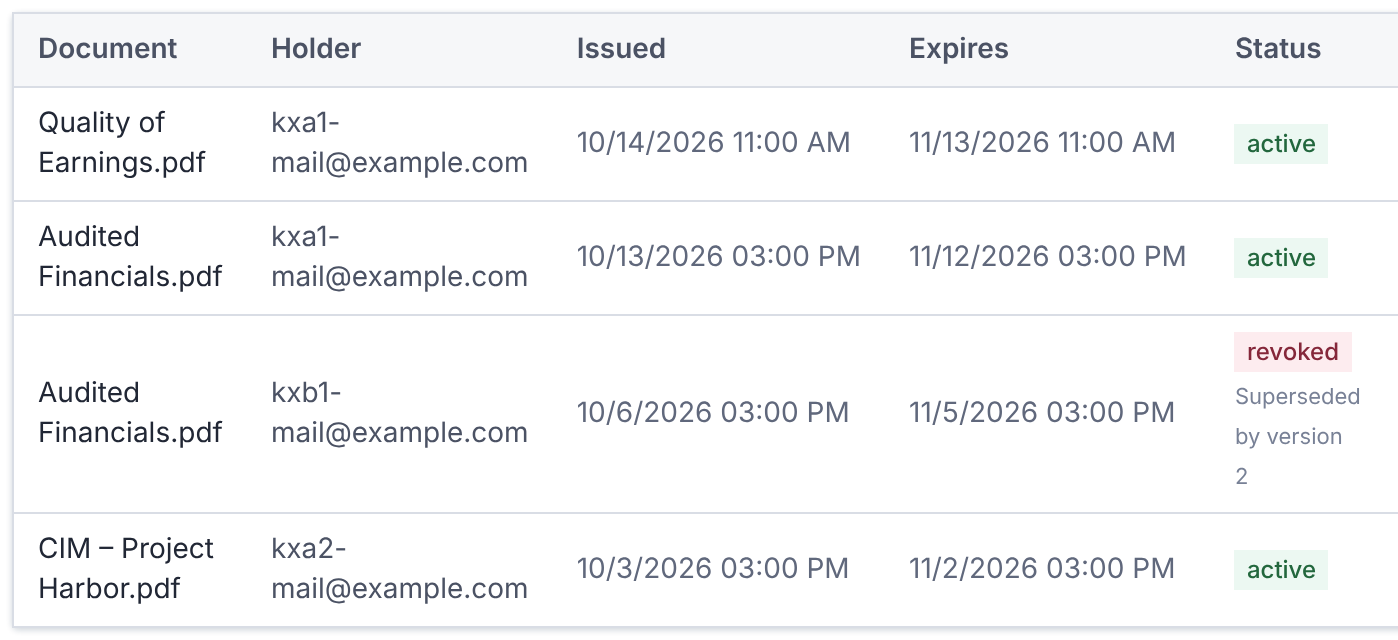
Each row is one copy: Document, Holder, Issued, Expires, Status, Devices, Opens and Last activity.
Search by document or holder, and filter by Active, Revoked or Expired.
An over limit mark shows a copy opened on more devices than the policy allows.
Revoke a Copy
- 1.Select Revoke on the row.
- 2.Enter a Reason. It's recorded in the deal's activity.
- 3.Select Revoke download.
The copy stops opening at its next open or lease renewal. To revoke everything, select Revoke all.
Revoking can't be undone, but the holder can download a new copy if they still have access.
Questions
- Does removing someone revoke their copies?
- Their copies stop opening, because access is checked each time. The rows aren't marked revoked, so revoke them too for a clear record.