
What It Checks
Under Review agents, four groups can each be switched off.
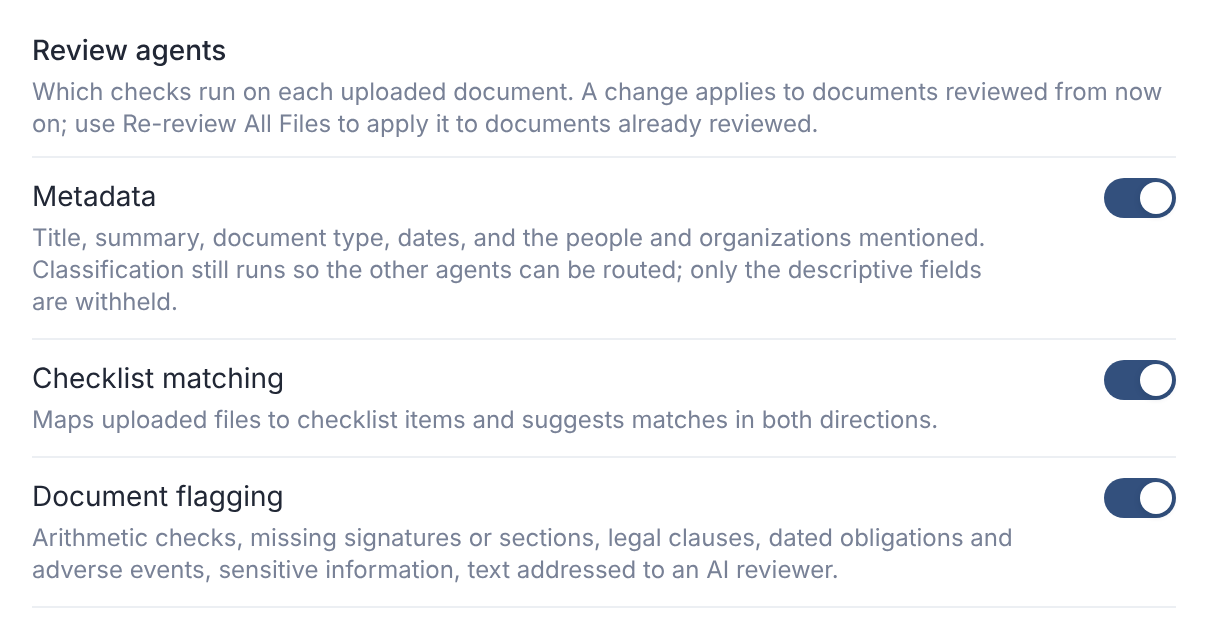
| Group | What it does |
|---|---|
| Metadata | Title, summary, document type, dates, and the people and organizations mentioned. |
| Checklist matching | Maps uploaded files to checklist items, and suggests matches. |
| Document flagging | Arithmetic, missing signatures or sections, legal clauses, dated obligations, adverse events, sensitive information, text aimed at an AI reviewer. |
| Cross-document analysis | Relations between documents, financial facts and claims, used by Deal Signals. |
A change applies to documents reviewed from then on.
When It Runs
Review starts as soon as a file is uploaded. Files wait their turn in a shared queue, so timing varies.
Progress shows in the bell. Scanned PDFs are read with text recognition, in English and Spanish.
Presentations, CIMs and teasers get a lighter review, without the flagging checks.
The AI Review Allowance
Each deal includes an allowance of AI review. When a deal has used it, AI review pauses for that deal and nothing is charged. Paused review is held, not lost. It resumes in order if the allowance is raised. Larger documents and new versions use more of the allowance.
While review is paused, AI work that members start is refused:
| Message | What to do |
|---|---|
| AI review is paused for this deal: it has used its included AI review. An organization administrator can request more from the Usage page. | Ask an organization administrator. See Check Usage and Your AI Review Allowance. |
Re-Run or Clear Review
| Button | What it does |
|---|---|
| Re-review Flagged Files | Re-runs review on every flagged file. Their findings are replaced. |
| Re-review All Files | Re-runs review on every file. All findings are replaced. |
| Clear All AI Review | Removes every finding and flag. Files and versions are untouched. |
For one file, open it and choose More options → Reprocess file or Clear AI review.
Clear All AI Review can't be undone. You can run review again afterwards.
Turn It Off
Turn off Enable AI. That also switches off the Assistant and Deal Signals.
Turning AI back on doesn't turn those back on, or review files uploaded meanwhile. Use Re-review All Files.
Request analysis still runs while AI is off.
Who Sees the Findings
Members see findings only where their folder access includes View AI Review.