
Read the Signals Page
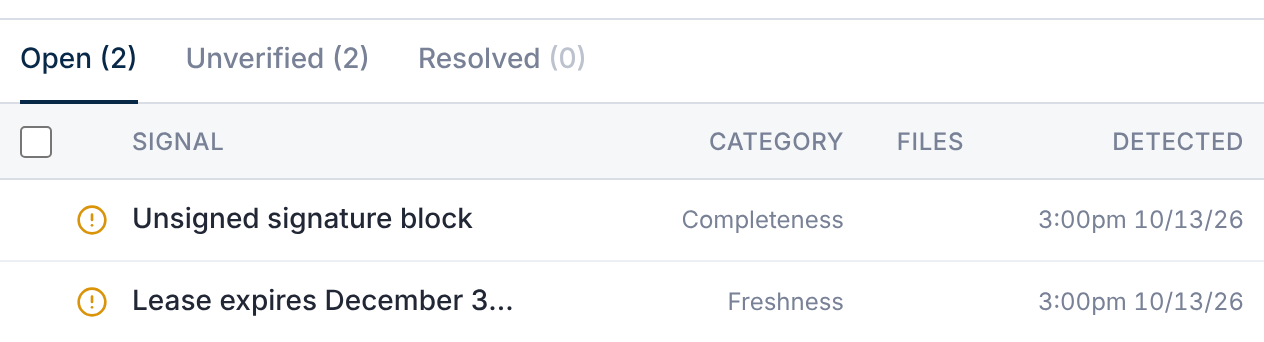
- Tabs: Open, Unverified (open, and not yet certain) and Resolved.
- Filter by severity: High, Medium or Low.
- Each signal shows how sure it is: Confirmed, Likely or Possible.
Export saves the list. Refresh runs a deal-wide review now.
Act on a Signal
| Action | What it does |
|---|---|
| Fixed | Marks it resolved. No note needed. |
| Dismiss | Resolves it with a reason and a required note, kept in the deal record. |
| Reopen | Moves a resolved signal back to Open. |
A signal shows Retired when it no longer applies, for example after its pack is switched off.
Choose Packs and the Schedule
In Deal Settings → AI → Deal Signals:
- Enable Deal Signals: on by default. It needs AI turned on.
- Deal-wide AI review: Weekly (the default), Monthly or Manual only.
- Signal packs: room hygiene, document defects, cross-document consistency and access risk apply to every deal.
- M&A deals add earnings quality, coverage blind spots, narrative vs. records, and concentration.
Switching a pack off retires its open signals.
Access risk flags a file naming one outside company that another party can open. It also flags a person assigned against their email domain. Only the deal owner, and deal-wide members who can see users, see these signals.
Questions
- Who can see signals?
- The deal owner, and members whose permission set includes Deal Signals. Members with folder AI review see signals on documents they can open.