
Start a Discussion on a Document
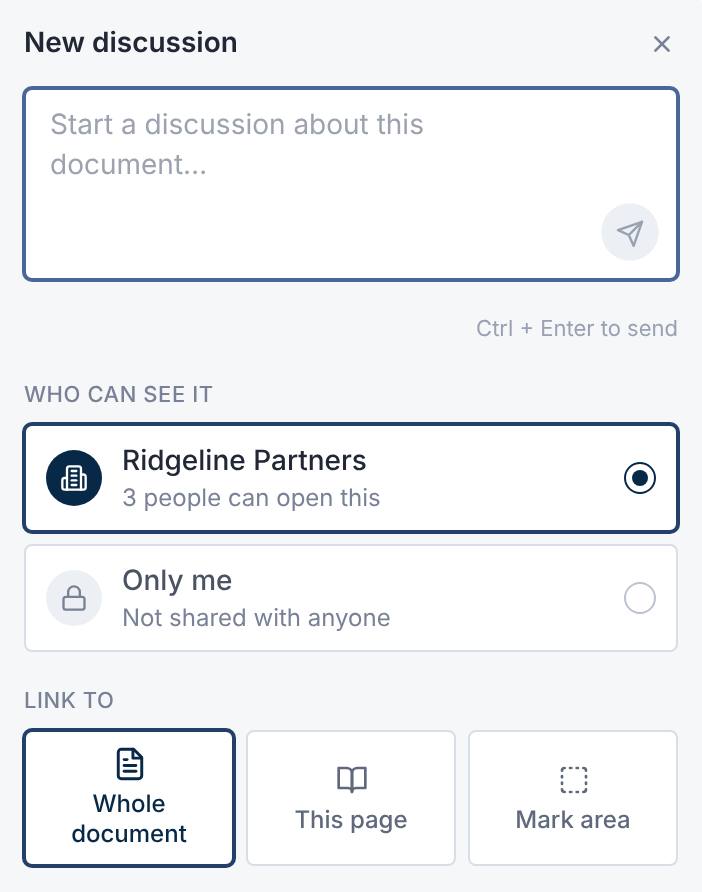
- 1.Open the document. In the side panel, open Discussions.
- 2.Select New discussion.
- 3.Type your message. Type @ to mention someone.
- 4.Under Who can see it, choose the audience.
- 5.Under Link to, choose Whole document or This page. In a PDF, you can also Mark area.
- 6.Select the send icon inside the message box, or press Ctrl + Enter (⌘ + Enter on a Mac).
In a PDF, you can also select some text and choose Discuss to discuss that passage.
To discuss a folder, open it in All Files and select Discussions in the toolbar.
Who Can See It
Each discussion is visible only to its audience. The last line of the new discussion box says who that is.
| Audience | Who sees it |
|---|---|
| Your company's name | People at your company in this deal who can open the document. |
| Deal team | The deal owner and deal-wide members who can open the document. |
| Only me | Just you. A private note. |
You see only the audiences your access allows. With no company in the deal, every note is Only me.
Reply, Edit and Resolve
- Type in the reply box under a thread, then send.
- To change or remove your own message, open its Message actions menu and choose Edit or Delete.
- Select Resolve when a thread is done. Anyone who can post in it can Reopen it.
Resolved threads fold under Show resolved.
Turn a Company Discussion Into a Question
In a thread with your company, select Ask the deal team….
It opens Ask Question with the first message filled in. Edit it, then select Submit Question.
Your company's discussion stays private. The deal team sees only the question.
See Every Discussion
Select Discussions in the sidebar. The tabs are All, Mentions, Mine and Only me.
Search, or filter by Status and Folder. Select Export for an Excel or CSV file.
What People Are Told
A mention notifies the person you mention. A reply notifies everyone else in the thread. Private notes notify no one.
Emails carry a link only, never the message or the document's name. Their subject reads New discussion activity in and the deal's name.
Questions
- Can the deal team read my company's discussions?
- No. A discussion is visible only to its audience. Ask the deal team… sends them a question, not the discussion.
- Why can I read discussions but not post?
- Your access is Read only for Discussions. The deal team sets this in your permission set.