
The Levels
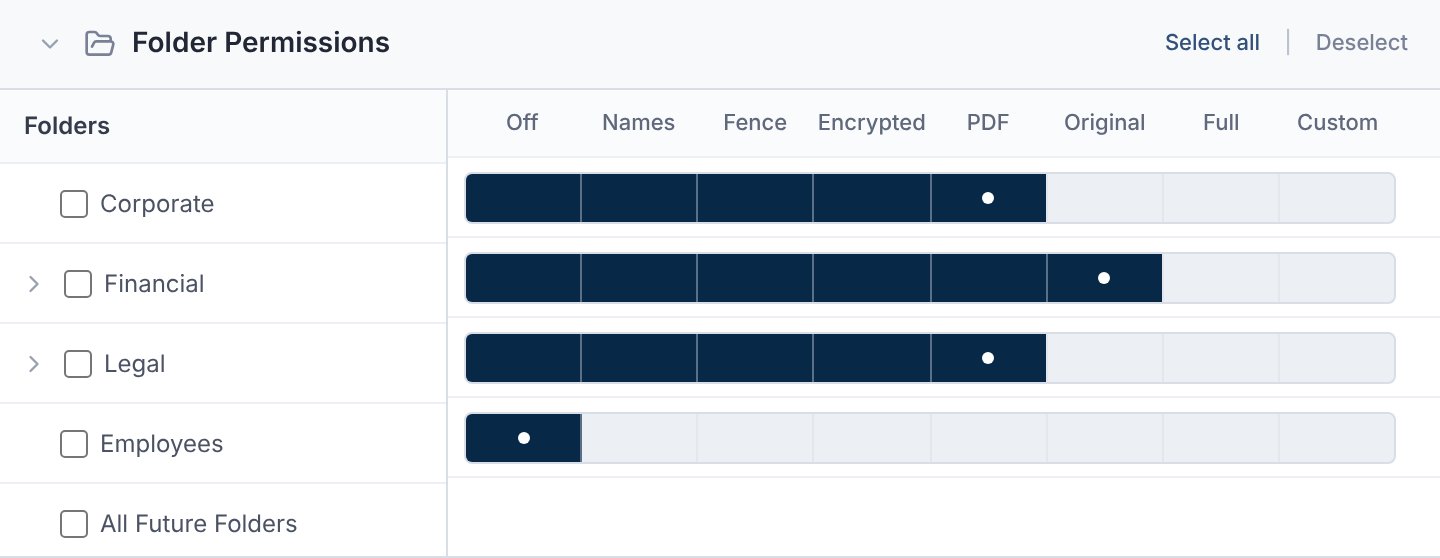
| Level | What it allows |
|---|---|
| Off | No access to this folder. |
| Names | File names only; content stays hidden. |
| Fence | View in the protected viewer; no downloads. |
| Encrypted | Encrypted viewer; no downloads. |
| View, and download as PDF, with a watermark. | |
| Original | View, and download the original files. |
| Full | Everything, including upload, edit, delete and manage. |
| Custom | Choose each permission yourself. |
Encrypted works in any deal. It doesn't need document protection (DRM) turned on.
Custom Permissions
| Group | Permissions |
|---|---|
| File Management | Uploading, Downloading, Edit File, Deleting. |
| Q&A Management | Submit Questions, Receive & Answer Questions, Edit Q&A. |
| AI Review | View AI Review, Re-process Files. |
| Activity | Folder Activity. |
| Document Protection | Printing, Remove Watermark, Plain Download (DRM Exempt). |
| Manage Folder | Grants all folder permissions, except Remove Watermark. |
Printing is on in every level. Turn it off in Custom to stop printing from that folder.
Fence and Encrypted always turn downloading off.
Plain Download (DRM Exempt) matters only when DRM is on. Downloads from the folder are then originals, not protected copies. It needs Downloading.
Subfolders and New Folders
Setting a folder also sets its subfolders you haven't changed. They show inherited.
A new subfolder starts with its parent's access. The All Future Folders row sets access for new top-level folders.
Permissions for One File
The deal owner can give a single file its own rules.
- 1.Open the file, then More options → Manage permissions.
- 2.Choose Custom Permissions.
- 3.Under Allowed Access and Denied Access, pick users, groups or tags.
- 4.Select Save Permissions.
A user's own rule beats a group or tag rule. With custom rules, anyone not allowed can't see the file.
Questions
- Which level stops copying text?
- Fence and Encrypted. Both use the protected viewer and allow no download.