
Prepare Your File
Select Import, then Download the template for a ready-made workbook.
| Column | What goes in it |
|---|---|
| Question | Required. Up to 5,000 characters. |
| Category | Optional. One of this deal's categories. |
| Priority | Optional. Low, Normal or High. Blank means Normal. |
| Reference | Optional. An index number such as 3.2.1, or a folder path. |
Format the Reference column as text. Otherwise Excel may turn 3.2.1 into a date.
Import the Questions
- 1.Select Q&A in the sidebar, then Import.
- 2.Drop your file in, or click to choose it. It can be up to 5 MB.
- 3.Review the preview. Each row shows its result and any notes.
- 4.Untick any row you don't want.
- 5.Select Import, followed by the number of questions.
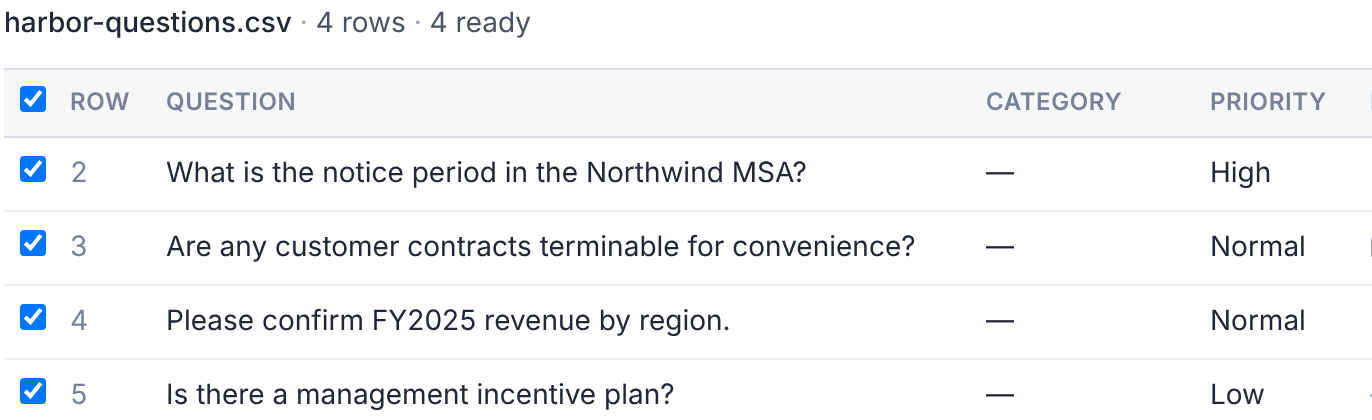
The deal team is notified once, for the whole batch.
What the Notes Mean
| Note | What happens |
|---|---|
| No question text. | The row can't be imported. |
| … is not a category in this deal | It imports without a category. |
| … is not a priority | It imports as Normal. |
| Reference not found | It imports without a reference. You may not have access to that folder. |
| Same question as row … | A duplicate. The row starts unticked. |
| You already asked this question. | The row starts unticked. |
| Over your question limit. | The row won't be imported. |
Imported questions are private, like any question you ask. Each row counts toward the deal's question limit.
Export Your Questions
Select Export in Q&A to download an Excel file, qna-export.xlsx.
It lists the questions you can see, with their status, latest answer and linked documents.
Questions
- Can I import an older .xls file?
- No. Save it as .xlsx or .csv first.